Key takeaways
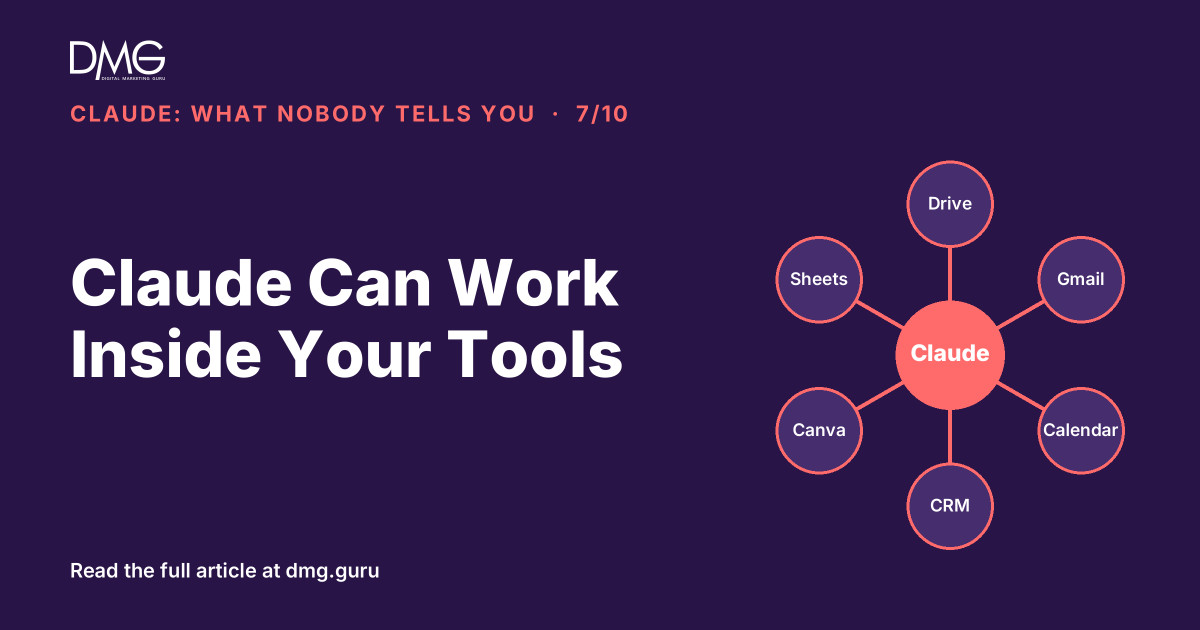
- Connectors link Claude to apps you already use, such as Google Drive, Slack or project tools, so it can work with your real data instead of what you paste in.
- You add them under Customize → Connectors, or from the “+” menu in a chat.
- For each tool a connector offers, you decide: always allow, ask for approval, or block. Start with read access and approval on anything that changes data.
Contents
Most people use Claude as a separate window. They open a document, copy part of it, paste it into the chat, copy the answer back. Connectors remove that loop.
What a connector is
A connector gives Claude secure access to another app. Once Google Drive is connected, you can say “find last quarter’s proposal for the spa client and summarise the pricing” and Claude searches your Drive itself. Connect your team chat or project tool, and it can read threads or tasks and help you act on them.
Anthropic’s directory lists connectors for many common business tools, and organisations can add custom ones.
How to add one
- Go to Customize → Connectors, or click “+” in a chat, then Connectors → Manage connectors.
- Pick the app and sign in to give access.
- In a chat, turn the connector on from the “+” menu when you need it.
On Team and Enterprise plans, an owner must enable connectors for the organisation first. Free users can add one custom connector.
Control what Claude can do
Each connector offers tools: search files, read a message, create a task, send something. For each one you can choose:
- Always allow: Claude uses it without asking.
- Needs approval: Claude asks before each use.
- Blocked: Claude can’t use it.
Our rule for clients: reading can be “always allow”. Anything that sends, deletes or changes data stays on “needs approval” until you trust the workflow.
Where to start
- Google Drive or your file storage. The fastest win: Claude finds and summarises your own documents.
- Your team chat. “What did the team decide about the Tet promotion?”
- Your project or CRM tool. Turn meeting notes into tasks, or check which deals have gone quiet.
Connect one tool, use it for a week, then add the next.
Frequently asked questions
What are Claude connectors?
Connectors link Claude to other apps, such as Google Drive or Slack, so it can search, read and, with your permission, act in them.
Is it safe to connect my business tools?
You control each tool a connector offers: always allow, needs approval, or blocked. Keep actions that change data on approval, and only connect what the task needs.
Can Free users use connectors?
Yes. Anthropic says Free users can add one custom connector. On Team and Enterprise plans, an owner must enable connectors first.
Next step: See where your marketing really stands with DMG’s Full Business Audit.
Want help setting up Claude for your team? Talk to DMG.
Claude: What Nobody Tells You, part 7 of 10. Facts checked against Anthropic’s help article on connectors on 13 November 2026; features and plans may change.
Follow DMG on Google: add dmg.guru as a preferred source
Related articles
 Your Best Salesperson Is Hiding Your Marketing Problem
 Boosting Your Bottom Line: How to Optimize Your Sales Process for Better Paid Ad ROI
 Start With Your Business Problem, Not the AI Tool
 How Coca-Cola Stole Christmas: A Case Study in Cultural Branding
 How can you help a franchise develop a brand identity that stands out?